Omnipotent Media Player8.6.4
Publisher Description
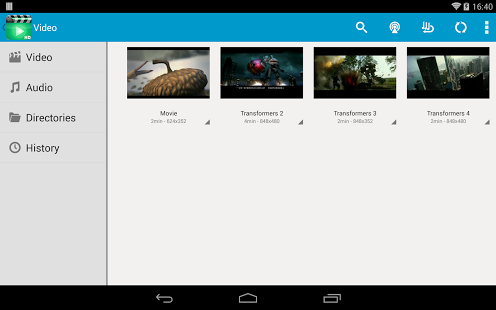
Omnipotent Media Player - Supported 200+ Video and Audio Formats.
This media player is the ultimate multimedia player that plays most multimedia files as well as discs, devices, and network streaming protocols.
Saves you the trouble of installing multiple Apps by providing many common multi-media features. You can use it as a replacement of or to supplement your existing Media Apps.
We ensure you will love this video player after using it.If you are pursuing a video player with the better user experience and user interface,Video Player Ultimate will be your best choice.
The best way to enjoy your movies.
Key Features:
- automatic search all mobile phone video and music files
- supports all video and audio playback formats
- supports multiple subtitle formats, automatic synchronization
- using hardware decoding, take advantage of hardware acceleration
- small memory, simple operation, quick start, smooth playback support
- Flash formats video - flv, asf videos
- Thumbnail displays of videos
- HD video playing memory optimization
- Playing gesture
- Play History list
- Connect online video.
- Playback speed control
- Sleep time setting
- Add subtitle file
About Omnipotent Media Player
The company that develops Omnipotent Media Player is JolieJoy. The latest version released by its developer is 8.6.4.
To install Omnipotent Media Player on your Android device, just click the green Continue To App button above to start the installation process. The app is listed on our website since 2014-11-08 and was downloaded 141 times. We have already checked if the download link is safe, however for your own protection we recommend that you scan the downloaded app with your antivirus. Your antivirus may detect the Omnipotent Media Player as malware as malware if the download link to fg.jj.media is broken.
How to install Omnipotent Media Player on your Android device:
- Click on the Continue To App button on our website. This will redirect you to Google Play.
- Once the Omnipotent Media Player is shown in the Google Play listing of your Android device, you can start its download and installation. Tap on the Install button located below the search bar and to the right of the app icon.
- A pop-up window with the permissions required by Omnipotent Media Player will be shown. Click on Accept to continue the process.
- Omnipotent Media Player will be downloaded onto your device, displaying a progress. Once the download completes, the installation will start and you'll get a notification after the installation is finished.
Program Details
System requirements
Download information
Pricing
Version History
version 8.6.4
posted on 2014-11-08
version 8.6.4
posted on 2014-11-08
Several fixes and updates
